SnapNote云便签
目录
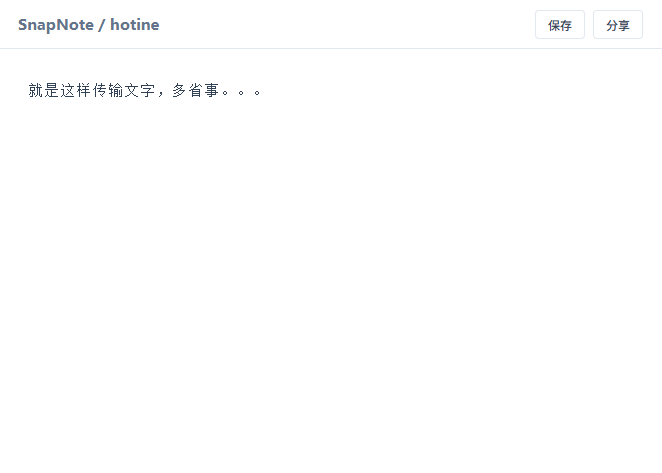
正文有时候需要把手机上的一段文字传给电脑,或者分享给其他人,用微信有很多限制,用邮箱也不够方便。所以,通过SnapNote,就可以通过一段简单的网址,方便的分享内容。 使用方法:
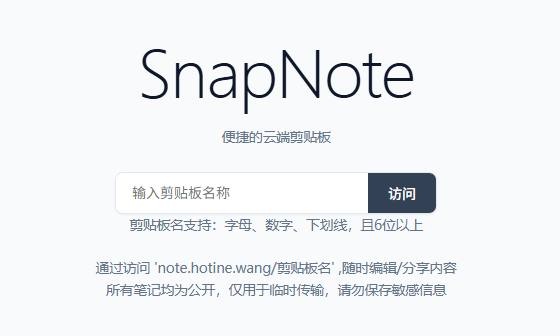
- 访问应用网址,例如:
http://localhost:2334,会提示输入剪贴板名称 - 进入剪贴板后,编辑完成后可以直接点保存,或者点分享(保存并把网址复制到剪贴板)
- 后续如果想查看笔记,可以在首页输入笔记名称,也可以直接访问
http://localhost:2334/笔记名称 - 本程序笔记不加密,只要知道笔记名,就可以查看/修改笔记,因此不要存放重要信息。

后端Nodejs代码:
const http = require('http');
const fs = require('fs');
const path = require('path');
const url = require('url');


const PORT = 2334;
const DATA_DIR = path.join(__dirname, 'data');
const MAX_SIZE = 1 * 1024 * 1024; // 限制 1MB,防止恶意撑爆硬盘

// 启动检查
console.log("--- SnapNote Server Starting ---");
if (!fs.existsSync(DATA_DIR)) {
    fs.mkdirSync(DATA_DIR);
}

const server = http.createServer((req, res) => {
    const parsedUrl = url.parse(req.url, true);
    const pathname = parsedUrl.pathname;

    // 1. 处理 API 获取数据
    if (pathname === '/api/get' && req.method === 'GET') {
        const noteName = parsedUrl.query.name;
        // 正则校验:只允许字母数字下划线,且长度在 6-64 位,防止路径穿透和超长请求
        if (!noteName || !/^\w{6,64}$/.test(noteName)) {
            res.writeHead(400);
            return res.end('Invalid Name');
        }

        const filePath = path.join(DATA_DIR, noteName);
        if (fs.existsSync(filePath)) {
            const content = fs.readFileSync(filePath);
            res.writeHead(200, { 'Content-Type': 'text/plain; charset=utf-8' });
            res.end(content);
        } else {
            res.writeHead(200, { 'Content-Type': 'text/plain; charset=utf-8' });
            res.end('');
        }
        return;
    }

    // 2. 处理 API 保存数据
    if (pathname === '/api/save' && req.method === 'POST') {
        const noteName = parsedUrl.query.name;
        if (!noteName || !/^\w{6,64}$/.test(noteName)) {
            res.writeHead(400);
            return res.end('Invalid Name');
        }

        // --- 新增:预检 Content-Length ---
        const clen = parseInt(req.headers['content-length'], 10);
        if (!isNaN(clen) && clen > MAX_SIZE) {
            res.writeHead(413);
            return res.end('Content too large (header check)');
        }

        const filePath = path.join(DATA_DIR, noteName);
        let body = '';
        let bodyLen = 0;

        req.on('data', chunk => {
            bodyLen += chunk.length;

            // 实时检查大小
            if (bodyLen > MAX_SIZE) {
                console.log(`[Blocked]: ${noteName} exceeded size limit.`);
                res.writeHead(413);
                res.end('Content too large');
                // 销毁请求,不再接收后续数据,防止带宽浪费
                req.destroy();
                return;
            }
            body += chunk.toString();
        });

        req.on('end', () => {
            // 如果连接已被 destroy(),end 事件仍可能触发,这里加个保护
            if (res.writableEnded || bodyLen > MAX_SIZE) return;

            try {
                const trimmedBody = body.trim();
                if (trimmedBody === '') {
                    if (fs.existsSync(filePath)) {
                        fs.unlinkSync(filePath);
                        console.log(`[Delete]: ${noteName}`);
                    }
                    res.writeHead(200);
                    res.end('Deleted');
                } else {
                    fs.writeFileSync(filePath, body); // 写入完整的 body
                    console.log(`[Save]: ${noteName} (${(bodyLen / 1024).toFixed(1)} KB)`);
                    res.writeHead(200);
                    res.end('Success');
                }
            } catch (err) {
                console.error(`[IO Error]: ${err.message}`);
                res.writeHead(500);
                res.end('IO Error');
            }
        });
        return;
    }

    // 3. 静态页面逻辑
    if (pathname === '/favicon.ico') {
        res.writeHead(204);
        return res.end();
    }

    const htmlPath = path.join(__dirname, 'index.html');
    fs.readFile(htmlPath, (err, html) => {
        if (err) {
            res.writeHead(500);
            res.end('index.html missing');
        } else {
            res.writeHead(200, { 'Content-Type': 'text/html; charset=utf-8' });
            res.end(html);
        }
    });
});

server.listen(PORT, '127.0.0.1', () => {
    console.log(`Internal server ready on http://127.0.0.1:${PORT}`);
});
前端HTML代码:
<!DOCTYPE html>
<html lang="zh-CN">

<head>
    <meta charset="UTF-8">
    <meta name="viewport" content="width=device-width, initial-scale=1.0">
    <!-- 网站图标:动态 SVG 格式 -->
    <link rel="icon"
        href="data:image/svg+xml,<svg xmlns='http://www.w3.org/2000/svg' viewBox='0 0 24 24' fill='%23334155'><path d='M3 17.25V21h3.75L17.81 9.94l-3.75-3.75L3 17.25zM20.71 7.04c.39-.39.39-1.02 0-1.41l-2.34-2.34c-.39-.39-1.02-.39-1.41 0l-1.83 1.83 3.75 3.75 1.83-1.83z'/></svg>">
    <title>SnapNote</title>
    <style>
        :root {
            --bg-main: #ffffff;
            --bg-accent: #f8fafc;
            --text-primary: #0f172a;
            --text-secondary: #64748b;
            --line-color: #e2e8f0;
            --action-color: #334155;
        }

        body,
        html {
            margin: 0;
            padding: 0;
            height: 100%;
            font-family: "Inter", -apple-system, system-ui, "Segoe UI", Roboto, sans-serif;
            background: var(--bg-main);
            color: var(--text-primary);
            -webkit-font-smoothing: antialiased;
        }

        .hidden {
            display: none !important;
        }

        /* 气泡提示:极简黑 */
        .toast {
            position: fixed;
            top: 20px;
            left: 50%;
            transform: translateX(-50%);
            background: rgba(15, 23, 42, 0.9);
            color: #fff;
            padding: 10px 20px;
            border-radius: 6px;
            font-size: 13px;
            z-index: 9999;
            box-shadow: 0 4px 6px -1px rgba(0, 0, 0, 0.1);
            opacity: 0;
            transition: all 0.2s ease;
            pointer-events: none;
        }

        .toast.show {
            opacity: 1;
            transform: translateX(-50%) translateY(5px);
        }

        /* 首页:极致轻量化 */
        #home {
            display: flex;
            flex-direction: column;
            align-items: center;
            justify-content: center;
            height: 100vh;
            background: var(--bg-accent);
        }

        #home h1 {
            font-size: 4rem;
            margin: 0 0 12px 0;
            color: var(--text-primary);
            font-weight: 300;
            letter-spacing: -0.02em;
        }

        .intro-text {
            text-align: center;
            line-height: 1.6;
            color: var(--text-secondary);
            font-size: 0.85rem;
            margin-bottom: 24px;
            max-width: 400px;
        }

        .home-box {
            display: flex;
            align-items: center;
            gap: 0;
            border: 1px solid var(--line-color);
            border-radius: 8px;
            background: #fff;
            overflow: hidden;
            box-shadow: 0 1px 2px rgba(0, 0, 0, 0.05);
        }

        #noteNameInput {
            padding: 10px 16px;
            width: 220px;
            border: none;
            outline: none;
            font-size: 14px;
            color: var(--text-primary);
        }

        #home button {
            padding: 10px 20px;
            background: var(--action-color);
            color: white;
            border: none;
            cursor: pointer;
            font-size: 14px;
            font-weight: 500;
            transition: opacity 0.2s;
        }

        #home button:hover {
            opacity: 0.9;
        }

        /* 编辑页布局 */
        #notePage {
            display: flex;
            flex-direction: column;
            height: 100vh;
        }

        /* 压缩后的标题栏 */
        header {
            display: flex;
            justify-content: space-between;
            align-items: center;
            padding: 0 20px;
            height: 48px;
            background: #fff;
            border-bottom: 1px solid var(--line-color);
        }

        header h3 {
            margin: 0;
            font-size: 0.95rem;
            font-weight: 700;
            color: var(--text-secondary);
        }

        .header-btns {
            display: flex;
            gap: 8px;
        }

        .header-btns button {
            padding: 5px 12px;
            cursor: pointer;
            border: 1px solid var(--line-color);
            border-radius: 4px;
            background: #fff;
            color: var(--action-color);
            font-weight: 500;
            font-size: 12px;
            transition: all 0.2s;
        }

        .header-btns button:hover {
            background: var(--bg-accent);
            border-color: #cbd5e1;
        }

        /* 编辑区:内容为王 */
        #editor {
            flex: 1;
            width: 100%;
            border: none;
            padding: 30px;
            box-sizing: border-box;
            font-family: "JetBrains Mono", "SFMono-Regular", Consolas, monospace;
            font-size: 15px;
            line-height: 1.6;
            outline: none;
            resize: none;
            color: #334155;
            background: #fff;
        }

        /* 滚动条 */
        #editor::-webkit-scrollbar {
            width: 5px;
        }

        #editor::-webkit-scrollbar-thumb {
            background: #e2e8f0;
            border-radius: 10px;
        }
    </style>
</head>

<body>
    <div id="toast" class="toast"></div>

    <div id="home" class="hidden">
        <h1>SnapNote</h1>
        <div class="intro-text">
            便捷的云端剪贴板<br />

        </div>
        <div class="home-box">
            <input type="text" id="noteNameInput" placeholder="输入剪贴板名称" spellcheck="false">
            <button onclick="goToNote()">访问</button>
        </div>
        <div class="intro-text">
            剪贴板名支持:字母、数字、下划线,且6位以上<br /><br />
            通过'https://本站网址/剪贴板名',随时随地编辑/分享内容<br />
            所有笔记均为公开,仅用于临时传输,请勿保存敏感信息
        </div>
    </div>

    <div id="notePage" class="hidden">
        <header>
            <h3 id="displayTitle">SnapNote</h3>
            <div class="header-btns">
                <button onclick="saveNote()">保存</button>
                <button onclick="shareNote()">分享</button>
            </div>
        </header>
        <textarea id="editor" spellcheck="false" placeholder="在此输入内容..."></textarea>
    </div>

    <script>
        const pathName = window.location.pathname.substring(1);

        function showToast(msg) {
            const toast = document.getElementById('toast');
            toast.innerText = msg;
            toast.classList.add('show');
            setTimeout(() => { toast.classList.remove('show'); }, 2000);
        }

        function isValidName(name) {
            if (name.length < 6) {
                showToast('需要 6 位以上');
                return false;
            }
            if (!/^\w+$/.test(name)) {
                showToast('仅限字母/数字/下划线');
                return false;
            }
            return true;
        }

        if (!pathName || pathName === "") {
            document.getElementById('home').classList.remove('hidden');
        } else {
            if (isValidName(pathName)) {
                initNotePage(pathName);
            } else {
                setTimeout(() => window.location.href = '/', 1000);
            }
        }

        function goToNote() {
            const name = document.getElementById('noteNameInput').value.trim();
            if (isValidName(name)) {
                window.location.href = '/' + name;
            }
        }

        async function initNotePage(name) {
            document.getElementById('notePage').classList.remove('hidden');
            document.getElementById('displayTitle').innerText = 'SnapNote / ' + name;
            try {
                const response = await fetch(`/api/get?name=${name}`);
                if (response.ok) {
                    const text = await response.text();
                    document.getElementById('editor').value = text;
                }
            } catch (e) { console.log('加载失败'); }
        }

        async function saveNote() {
            const content = document.getElementById('editor').value;

            // 前端初步检查 (Blob 转换可以准确获取字节数)
            const size = new Blob([content]).size;
            if (size > 1024 * 1024) {
                showToast('内容超过 1MB,无法保存');
                return;
            }
            try {
                const response = await fetch(`/api/save?name=${pathName}`, {
                    method: 'POST',
                    body: content
                });
                if (response.ok) {
                    const result = await response.text();
                    showToast(result === 'Deleted' ? '已清空并删除' : '已保存');
                    return true;
                }
            } catch (e) { showToast('网络连接错误'); return false; }
        }

        async function shareNote() {
            if (await saveNote()) {
                navigator.clipboard.writeText(window.location.href).then(() => {
                    showToast('已保存,链接已复制');
                });
            }
        }
    </script>
</body>

</html>